
Help guide · 9 of 26
Board
The same tasks as cards in columns, for moving work along a flow.
The Board shows the project's lists as columns and its tasks as cards. It is the same data as the List tab, just arranged for a flow — drag a card from To do to In progress and it moves list.
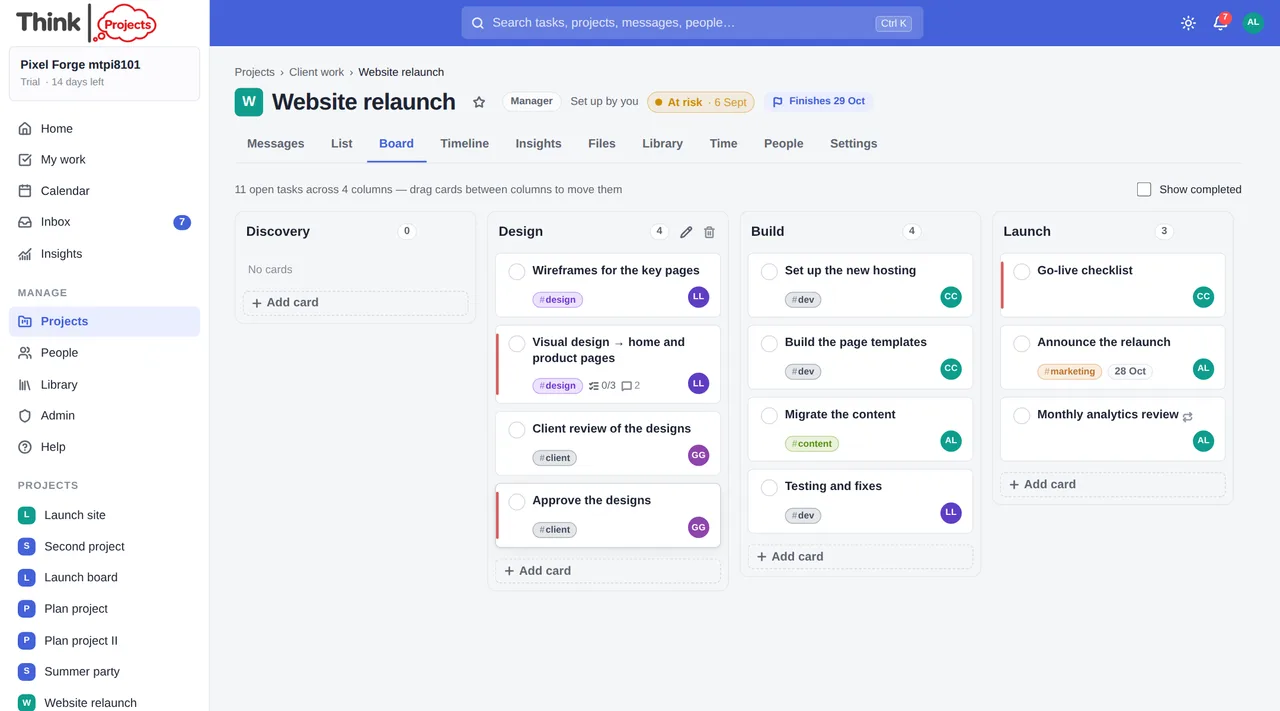
- Drag cards between columns, or up and down within one, to reorder. A card with subtasks takes them with it.
- Click a card to open the task drawer.
- Tick the circle on a card to complete it.
- Each card shows its tags, due date, subtask progress, comment and file counts and the assignee.
- Add a card at the foot of a column, with the same quick-entry shortcuts as the list (
@name,fri,2h,!high,#tag). - Add column makes a new list, with a colour for its heading if you want one; a column's heading can be renamed (double-click it), recoloured or deleted from its menu.
- A wide board scrolls sideways: drag any empty part of it, use the ‹ › buttons, or the mouse wheel.
- Export prints the board to PDF, sideways, fitted to the page.
- Show completed brings finished cards back into view.
Because a column is a list, anything you do here appears on the List and Timeline tabs too. Subtasks are not shown as their own cards — they count inside their parent's card.
Want to try it on your own work? Every feature on every plan, a 14-day trial, no card needed — and guests are always free.
Create a workspace