Notifications and email
Pop-ups, emails, quiet hours, the Monday summary and replying by email.
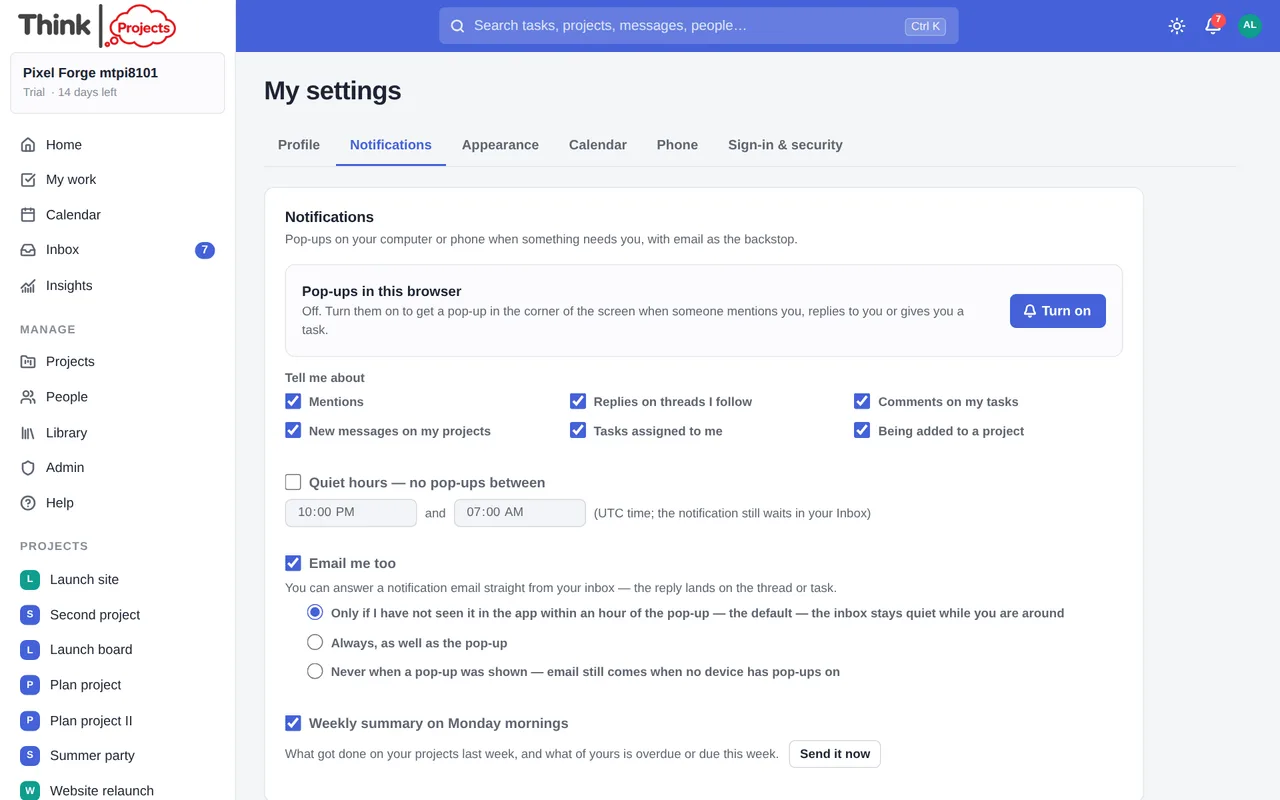
Everything that concerns you lands in your Inbox in the app. Whether it also reaches you as a pop-up on your devices or as an email is up to you, under My settings → Notifications.
What you are told about
Tick the kinds you want: mentions, replies on threads you follow, comments on your tasks, new messages on your projects, tasks assigned to you, being added to a project, approvals asked of you, check-in questions, and files added to a library.
Tasks and lists I follow covers anything you chose to follow (the eye button on a task or a list heading): comments, completion, a change of hands, moved dates, and tasks added to a followed list — see Tasks → Following.
Files added to a library goes to everyone on the project, including guests — a guest only ever sees the projects they are on. Several files dropped in at once are one notification, not one each, and it names them: "Creative brief.pdf, logo-final-v3.png", so you can tell from the email whether it is the thing you were waiting for. Files attached to a message or a task comment do not send a second notification — the message or comment already tells you, and now names what came with it.
Pop-ups on your devices
Turn on pop-ups in each browser you use. On a phone, add Think Projects to your Home Screen first (Share → Add to Home Screen on an iPhone; the browser's Install on Android) and turn pop-ups on from the installed app. Each device is listed so you can remove one, and Send a test pop-up checks it works.
Quiet hours hold pop-ups back overnight; the notification still waits in your Inbox.
Choose how email works alongside pop-ups:
- Only if I have not seen it in the app within an hour — the default. If a pop-up reached you and you opened the thing within the hour, no email is sent. If you did not, the email follows.
- Always — an email for every notification as well.
- Never when a pop-up was shown — email only if no device could show a pop-up.
Replying by email
Notification emails about a message or a task can simply be answered from your inbox. Your reply is posted as you, with quoted text and signatures removed, and the notification is marked read. Reply from the same address the email went to.
Reminders and snoozes
Remind me on the morning a task of mine is due sends one nudge per task at the time you set, in your own time zone — in the app, as a pop-up and by email. Tasks you have snoozed stay quiet. Reminders you set on a task yourself, and anything coming back from a snooze, arrive the same way; they ignore the pop-up kinds list and quiet hours, because you chose the time.
The Monday summary
Tick Weekly summary on Monday mornings for a one-minute briefing at the start of the week: Your priorities (your overdue work, what is due soon, decisions waiting on you — three at most), Worth knowing (a milestone overdue or at risk, work that is blocked, a finish that has moved, an email waiting for a reply, a status update to send — on the projects you are on), and Progress last week (what was finished, a line per project). Each item opens the thing itself, and the whole email stays short however many projects you are on. Send it now shows you what it looks like.
Trial tips by email
When you sign up there is an optional box: "Send me a few short emails to help me get started with Think Projects during my trial." It is never ticked for you, and leaving it blank changes nothing about signing up.
Ticking it is the only way to get these emails. They are a short series during the trial and nothing else — no newsletter, no offers, nothing after the trial ends. Every one carries an unsubscribe link that works without signing in, and your mail app's own Unsubscribe button works too.
There are four of them, spread across the trial and sent to whoever made the workspace: bringing your work across from another tool, guests being free, how the timeline works out a finish date, and time tracking. Each is skipped when you have already done the thing it is about — import a project and the import email never arrives — so a team that is getting on with it hears from us once or twice, and nobody is told about something they did last Tuesday.
The welcome email on the day you sign up is separate: it explains how to get started and goes to everyone, ticked or not. It is sent once.
You can turn them on or off at any time with Trial tips by email here in Notifications. It is a separate switch: turning it off leaves your other notification settings alone, and it never stops the emails the service has to send you — confirming your address, invitations, billing, and the warning before a workspace is closed.
Slack, Teams and Discord
A project manager can post a project's events to a chat channel — new messages, replies, tasks added and completed, milestones reached — from the project's Settings → Slack, Teams and Discord. See Projects.
Want to try it on your own work? Every feature on every plan, a 14-day trial, no card needed — and guests are always free.
Create a workspace